|
Acrobat Quoting
The Acrobat Quote Ops system is designed for the fast and reliable generation of quotes. You can simply enter the routing and give the client a price during the first phone call. Printed output can be generated in Word documents. This can cover confirmation of the initial quote to briefing passengers with sector timings and handling information. Once the quote is booked, sectors are automatically drawn on the Flight Ops board and updated when any further changes take place.
The basis for the software is a sector pricing model calculated using the flying time and hourly rate. Reliable sector timings either come from historical averages or are calculated from the mileage between stations. The hourly rate can be set individually for contract clients or via a calendar for ad-hoc clients.
Quotes
Acrobat Quoting makes light work of entering quotes. Simply enter the routing for mileages, timings and prices to be calculated. All the details of sectors and charges are shown on a single screen for easy reference. Sector pricing can be replaced by a demurrage charge if the total is under a daily minimum. Commission (broker or in-house) can be added for Ad-Hoc clients with net and gross total shown. All prices can be overridden at which point they are highlighted for easy identification.
Printed Output
Acrobat can generate professional word documents or excel spreadsheets for the client that can include pictures and descriptions of aircraft to be flown. Details of sectors, handling, passengers and pricing are inserted from templates that you can format yourself.
Flight Ops
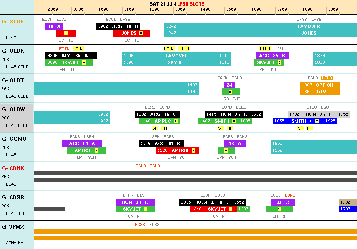
Acrobat Quoting is tightly integrated with Acrobat Flight Ops. When a quote is optioned or booked, sectors and periods of layover are automatically drawn on the Flight Ops display. Sectors are automatically updated when further changes to the quote are made. If a booked quote is cancelled then the sectors are moved to a cancellation tail for future reference.
Route Timing
A key feature is the reliable source of sector timings. The timing of existing routes comes from an average of the historical sectors you have flown. For new routes the timing is calculated from an aircraft specific formula using the mileage between stations.
|
|
Contract & Ad-Hoc Rates
It is easy to view and set Ad-Hoc rates using a calendar. Separate rates are possible for passenger and empty sectors on each aircraft type and are charged per flying hour.
Contract customers can have one or more contracts which specify their individual rates. There are passenger and empty rates in each contract which are charged on either flying hours, block hours or mileage.
Stations
It is easy to enter stations by IATA or ICAO code or even the name. You can also look up stations by country. Station details include restrictions (slots, permission & PPR) suppliers (catering, fuel & limo) and agents (handler & FBO). Stations with restrictions are highlighted in the quote and also on printed output for the crew.
Extra Charges
You can define your own charges which can appear automatically in quotes. Each charge has its own selection criteria which can match the individual characteristics of each quote. Charges can also be added, deleted and overridden on a quote specific basis. Charge types include arrivals or departures, handling, dead days, flying or ground hours, night stops and passengers.
Clients & Passengers
An extensive database allows you to record the details of both clients and passengers including their requirements and history. You can also store passports for passengers; contracts and contacts for clients.
Expected passenger numbers can be updated with actual passenger names when a quote is booked. Passenger lists can be generated for security, customs and immigration authorities.
Avinode Export
The flight schedule can be automatically exported to Avinode at a preset interval. Flights, layover, options and maintenance are all included. Brokers can then pick up empty legs and aircraft availability from the Avinode website.
|