|
Acrobat Flight Following
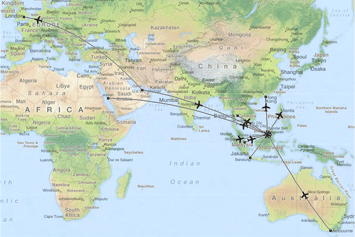
The Acrobat Flight Following System shows your route network on a scrolling world map with multiple zoom levels. From a simple display of great-circle routes to planned and actual routes with aircraft positions.
Display
The screen allows you to scroll around a world map, zoom in for more detail or out for an overview. You are not restricted to a single display so several copies can run at the same time: one showing entire route network on world map and one or more focused on a specific region.
Options
There are many standard options to customise the display including: fleets displayed; type of mapping; and date range. The flying programme can be broken down by fleet over several screens or colour coded on a combined screen. You can choose from several mapping sources: from simple political with country/regional boundaries, satellite showing terrain or a hybrid combining the two. By default the display will show the current flying programme (7 days from yesterday). However you can choose any start date and duration for which you have data.
Routes
Starting with a display of great circle routes from your flying programme you quickly gain an overview of your route network. This can be improved with more accurate routes by importing the waypoints used in company routes from navigation / flight planning. |
|
Positioning
Actual routes and positions can be displayed if a stream of positioning data from the aircraft can be supplied (e.g. ACARS). An aircraft icon on the display denotes the position and direction of travel for each tail. Aircraft on the ground are differentiated by pointing them in the direction of the next sector. You thus get a clearer indication of the numbers at a glance.
Best of both
The display runs from a local server so is not dependant on internet access for online mapping. However the display shares the same technology of scrolling map tiles so the data can easily be exported to the web.
Reports
A variety of reports aid in the recording and analysis of aircraft movements and maintenance. These include reports on flights, punctuality, delay statistics, fuel, load factors and unavailability.
Integration
The Acrobat Flight Following system is completely integrated with our Acrobat Crew Management and Acrobat Flight Ops systems, sharing the same database of flight and crew data. Operations changes, such as new or re-routed sectors are rapidly displayed. |